
LivePlan Review 2026
What each LivePlan plan includes, why the QuickBooks and Xero link decides between them, and how its yearly cost compares with PlanGuru, Fathom, Jirav and template-based options.

LivePlan is worth it in 2026 for an owner or a first finance hire who needs a lender-ready plan and a simple forecast for one company, and it is the cheapest packaged route to plan against actual reporting we found. Standard costs $15 a month and Premium $30 a month on annual billing, or $20 and $40 month to month, read on LivePlan's pricing page on November 4, 2026.
Buy Premium if you want the forecast tied to your books: the QuickBooks Online and Xero connection, budget vs. actual dashboards, what-if scenarios and Excel export all sit on Premium. Standard is a business plan writer with a forecast attached. A company that plans by department or across entities should look at PlanGuru or Jirav instead.
Key factsBest for: Owners and first finance hires writing a lender-ready plan…
- A guided business plan writer with a three-statement forecast that, on Premium, tracks against QuickBooks or Xero.
- Plan with QuickBooks and Xero: Premium only
- Active companies per plan: 1
- Refund window: 35-day money-back guarantee
- Alternatives covered: PlanGuru, Fathom, Jirav, ProjectionHub, LiveFlow
Pros
- Annual Premium is the lowest published yearly cost here for a forecast linked to QuickBooks or Xero.
- 550+ sample plans, AI drafting and lender-ready statements on both plans.
- Unlimited guests can view and comment, and five contributors can edit.
Cons
- QuickBooks and Xero sync, scenarios, budget vs. actual and Excel export are all Premium-only.
- One active company per plan and no departmental or multi-entity planning.
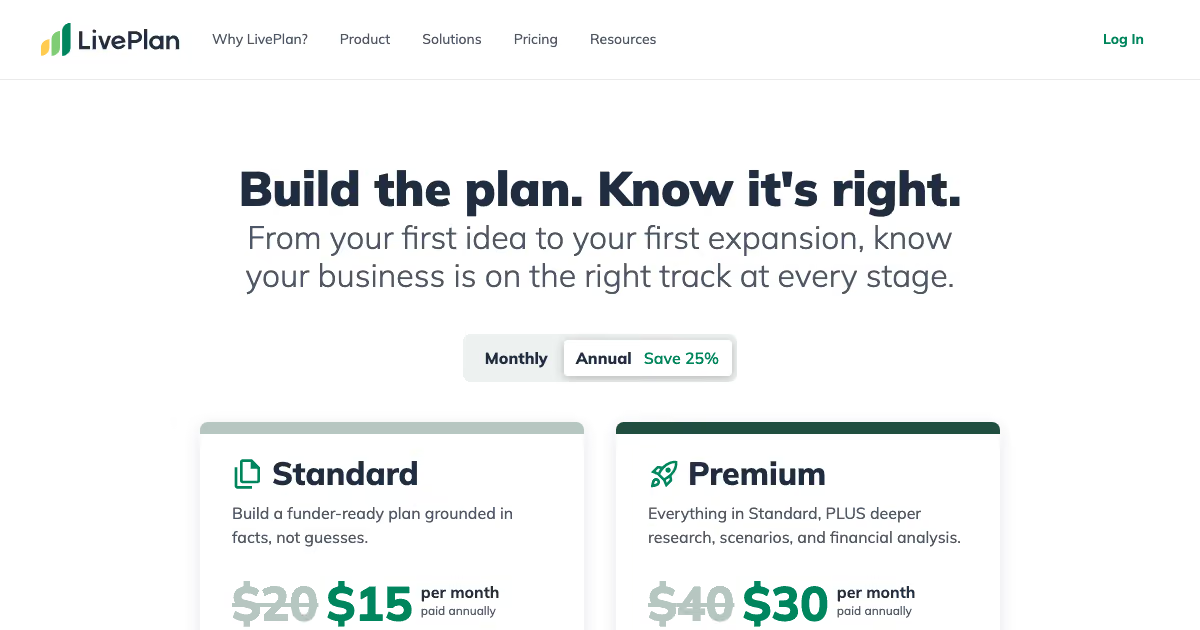
LivePlan sells a guided business plan, and the forecast is the part a finance lead should judge it on. The plan writer gets an owner to a funder-ready document; the Premium forecast is what keeps that document honest once actual results start arriving from QuickBooks or Xero.
Our view: annual Premium costs less than any tool here with a published price that ties a forecast to live accounting data, which makes it the default for a one-company business that has outgrown a spreadsheet plan. The trade is depth. One active company, a ten-scenario cap and no departmental planning mean a growing finance team will outgrow it.
Toolradar data: Toolradar, the software directory we run, tracks 20 financial planning tools as of November 4, 2026, and 16 of them (80%) are strictly paid with no free tier, per the Toolradar financial planning statistics. LivePlan fits that pattern: it has no free plan and offers a refund window instead of a trial.
How we compared: we read LivePlan's pricing page and FAQ, PlanGuru's plans page, Fathom's pricing page, Jirav's business and accounting firm pricing pages, ProjectionHub's pricing page and LiveFlow's pricing page on November 4, 2026. Every price on this page comes from those vendor pages; yearly totals are our arithmetic.
What is LivePlan?
LivePlan is a cloud business planning app from Palo Alto Software that combines a step-by-step plan writer, a three-statement financial forecast and, on Premium, a dashboard that compares the forecast with actual results from your accounting system.
The audience is wide on purpose. LivePlan sells to founders writing a plan for an SBA loan, to established small businesses building a yearly budget, and to the advisors, SBDCs, lenders and educators who work with them. Its pricing page claims more than 1.5 million businesses served.
For a CFO reader, the right frame is a lightweight planning tool for one entity, not an FP&A platform. It produces a projected profit and loss, balance sheet and cash flow, the lender-ready statements a bank asks for, and a pitch deck generated from the plan. It does not do departmental budgets, multi-entity consolidation or headcount models by role.
That puts it below Jirav and well below the mid-market tools in our AI budgeting and forecasting comparison, and closer to PlanGuru and to spreadsheet templates. The Cube review covers what the next step up looks like once spreadsheets and a single-entity app both run out.
How LivePlan works
Setup starts with a short questionnaire about the business, then a guide walks you through the plan section by section, with examples and a Help me Write feature that drafts text for each section. You can import an existing plan, notes or a spreadsheet forecast instead of starting blank.
The forecast is built inside LivePlan rather than in a free-form grid. You enter revenue streams, costs, staffing and financing, and LivePlan produces the three statements. An AI forecast builder takes changes in plain language, which helps an owner who does not model in Excel, while a finance hire may find the fixed structure limiting.
Premium is where the forecast meets the books. It connects to QuickBooks Online or Xero, builds a starting forecast from your accounting data, and then updates the profit and cash forecast as actual results post. Budget vs. actual dashboards with 20+ trend reports, automated monthly financial analysis and automated board reports run on top.
Collaboration is capped the same way on both plans: one active company, up to five contributors who can edit, and unlimited guests who can view and comment. You can create as many plans as you like, but only one is active at a time, so a consultant juggling several clients edits them one by one. Exports go to Word and PDF for the plan, PowerPoint for the pitch, and CSV for the Premium forecast.
Before you rely on the dashboards, close the month properly; the close management comparison covers the tools that get the books ready first.
LivePlan key features
LivePlan pricing
USD prices below were read on November 4, 2026 on LivePlan's pricing page, PlanGuru's plans page, Fathom's pricing page, Jirav's business pricing, Jirav's accounting firm pricing, ProjectionHub's pricing page and LiveFlow's pricing page.
LivePlan has two plans and one add-on. On annual billing, Standard comes to $180 a year and Premium to $360 a year; paying month to month raises them to $240 and $480 (our arithmetic). The annual commitment saves $120 a year on Premium, which matches the 25% saving the page advertises.
The LivePlan Expert add-on, billed monthly, buys 30-minute video sessions and priority help. Added to annual Premium it doubles the yearly bill to $720 (our arithmetic). A professional plan review is sold separately for a fee the pricing page does not state, so ask for it in writing before you book one.
Cost scenario for one company that wants its forecast tied to QuickBooks for a year, our arithmetic on printed prices: LivePlan Premium $360 billed annually; Fathom Starter $708 at $59 a month for one company; PlanGuru Single Entity $996 at $83 a month billed annually, for one user; Jirav Starter $10,000 a year. ProjectionHub's template bundle is a one-time $499 but does not connect to your books, and LiveFlow quotes each customer.
Two limits shape the bill more than the sticker. Both LivePlan plans include one active company, so an advisor with several clients either archives and reactivates plans or pays to add active companies. And there is no free trial: LivePlan offers a 35-day money-back guarantee, so build the forecast in that window and cancel if the QuickBooks link does not map your accounts cleanly.
| Plan | Price | Best for |
|---|---|---|
| LivePlan Standard, annual | $15/mo, paid annually | Plan writer, AI writing help, full forecast, lender-ready statements, pitch deck; 1 active company, 5 contributors |
| LivePlan Standard, monthly | $20/mo | Same Standard features with no annual commitment |
| LivePlan Premium, annual | $30/mo, paid annually | Adds QuickBooks Online and Xero sync, budget vs. actual, 10 scenarios, Excel export, board reports, benchmarks |
| LivePlan Premium, monthly | $40/mo | Same Premium features with no annual commitment |
| LivePlan Expert add-on | $30/mo, paid monthly | One-on-one 30-minute video meetings and priority help from a LivePlan Expert |
| PlanGuru Single Entity | $83/mo annual, $99 monthly | 1 user, QuickBooks Online and Xero import, 10-year budgets, unlimited scenarios |
| PlanGuru Single Entity with Analytics | $166/mo annual, $199 monthly | Adds dashboards, custom reports and AI narrative summaries |
| PlanGuru Multi-Unit Consolidations | $333/mo annual, $399 monthly | 3 users, consolidates departments, divisions or locations |
| Fathom Pro Starter | $59/mo | One connected company with reports, KPIs, forecasting and consolidations |
| Fathom Pro Gold | $450/mo | 25 companies included, $17 per extra company |
| Jirav Starter | $10,000/yr | Company-level planning, up to 24 months of data, 2 admins or editors |
| Jirav Pro | $15,000/yr | Departmental planning, up to 48 months of data, 5 admins or editors |
| ProjectionHub+ | $499 one time | Lifetime access to 100+ projection templates with five-year forecasts |
| LiveFlow | Custom | Multi-entity consolidation, budgeting and forecasting in Google Sheets or Excel |
LivePlan pros and cons
What we like
- Annual Premium is the lowest published yearly cost here for a forecast linked to QuickBooks or Xero.
- 550+ sample plans, AI drafting and lender-ready statements on both plans.
- Unlimited guests can view and comment, and five contributors can edit.
What could be better
- QuickBooks and Xero sync, scenarios, budget vs. actual and Excel export are all Premium-only.
- One active company per plan and no departmental or multi-entity planning.
Who LivePlan is for
LivePlan fits a single US small business, from a startup preparing an SBA application to an established company of a few dozen people, where the owner or one finance person writes the plan and wants a forecast that updates from QuickBooks Online or Xero without building a model in Excel.
It also fits SBDC counselors, accelerators and small advisory firms that coach owners through a plan, because the guided writer and unlimited guests suit a client who needs hand-holding more than modeling depth.
Skip it if you plan by department or entity. One active company and no departmental budgets rule out a multi-location business; PlanGuru's Multi-Unit Consolidations plan or Jirav's departmental Pro plan are the better fit there.
Skip it too if the plan already exists and the job is monthly reporting to a board or investors. Fathom or a reporting tool from our board reporting software comparison does that job with more control over the pack. If the immediate need is short-term liquidity, a 13-week cash flow forecast in a spreadsheet may serve you better than any annual plan.
Best LivePlan alternatives
If LivePlan is not the right fit, these are the closest options.
| Tool | Best for | Starts at | |
|---|---|---|---|
| LivePlan | Owners and first finance hires writing a lender-ready plan with a forecast for one company. | From $15/mo (Standard, billed annually) | Visit → |
| PlanGuru | Small businesses and nonprofits that want ten-year budgets, unlimited scenarios and consolidation without enterprise pricing. | From $83/mo (Single Entity, billed annually) or $99 monthly | Visit → |
| Fathom | Accountants and finance leads who need branded management reports and three-way cash forecasts. | From $59/mo for 1 company (Pro Starter) | Visit → |
| Jirav | Venture-backed companies with a finance team that budgets by department and reports to a board. | Starter $10,000/yr, Pro $15,000/yr, Enterprise by quote | Visit → |
| ProjectionHub | Founders who need one set of projections for an SBA loan and will not track actual results. | Free individual templates | Visit → |
| LiveFlow | Multi-entity finance teams that want consolidation and budgets inside Google Sheets or Excel. | Quote-only: LiveFlow publishes no list price | Visit → |


The bottom line
LivePlan is worth paying for on Premium when one company needs a written plan, a lender-ready forecast and a monthly check of that forecast against QuickBooks Online or Xero. Annual Premium does all three for less than any other tool on this page that publishes a price and connects to your books.
Standard is worth it only for the plan itself, such as a one-off SBA application; once you want scenarios or plan against actual, it is the wrong tier. Pick annual billing if you will keep the tool past six months, since month-to-month Premium costs $120 more a year.
Choose PlanGuru for longer budgets, unlimited scenarios or several locations, Fathom for client-ready management reports, and Jirav once the finance team budgets by department and the board expects a driver-based model. The wider shortlist is in the best cash flow forecasting tools, platform costs are in FP&A software pricing compared, and the ledgers LivePlan connects to are covered in our QuickBooks Online review and our Xero review, with the head-to-head in Xero vs QuickBooks Online.
For a first finance hire choosing a whole stack, see the tools for a first finance hire. Profiles: Jirav on Toolradar and Fathom on Toolradar.
Cite this: CFOpresso, "LivePlan Review 2026", November 2026.
Frequently asked questions
Is LivePlan worth it in 2026?
How much does LivePlan cost?
Does LivePlan have a free trial?
What is the difference between LivePlan Standard and Premium?
What is the best LivePlan alternative?
Sources
Prices and plan details come from each vendor's own pricing page, re-checked by the Toolradar pricing tracker.
- Fathom pricingchecked Sep 2026
Some offers on this page may be paid placements or contain affiliate links.
More CFOpresso reviews
Buyer guides and software reviews, with prices read from each vendor's own pricing page.
Browse all reviews